WhatsApp help FAQ πŸ‡²πŸ‡Ύ EN · MYR expand_more
Check-In Guide

How to Check In Online for Your Tioman SpeedBoat Sailing

Online check-in opens 24 hours before departure. Get your QR code boarding pass and skip the ticketing queue at Tanjung Gemok jetty.

schedule24 Hours Before Departure qr_code_2QR Code Boarding Pass fast_forwardSkip the Queue check_circleOptional But Recommended
Check-In Timing

When Online Check-In Is Available

The check-in window is tied to your scheduled sailing time. Outside this window the system will not accept check-in — even if your booking reference is ready.

schedule
Opens
24 hours before departure
Based on your sailing time
timer_off
Closes
30 minutes before departure
Check in before this deadline
wifi
Available
24/7 during the window
Any device, any browser
calendar_month
Example

For a 9:00 AM Saturday sailing, online check-in is available from 9:00 AM Friday until 8:30 AM Saturday.

Step by Step

Online Check-In — 3 Simple Steps

Complete the process on your phone or computer before arriving at the jetty. No app download required.

1

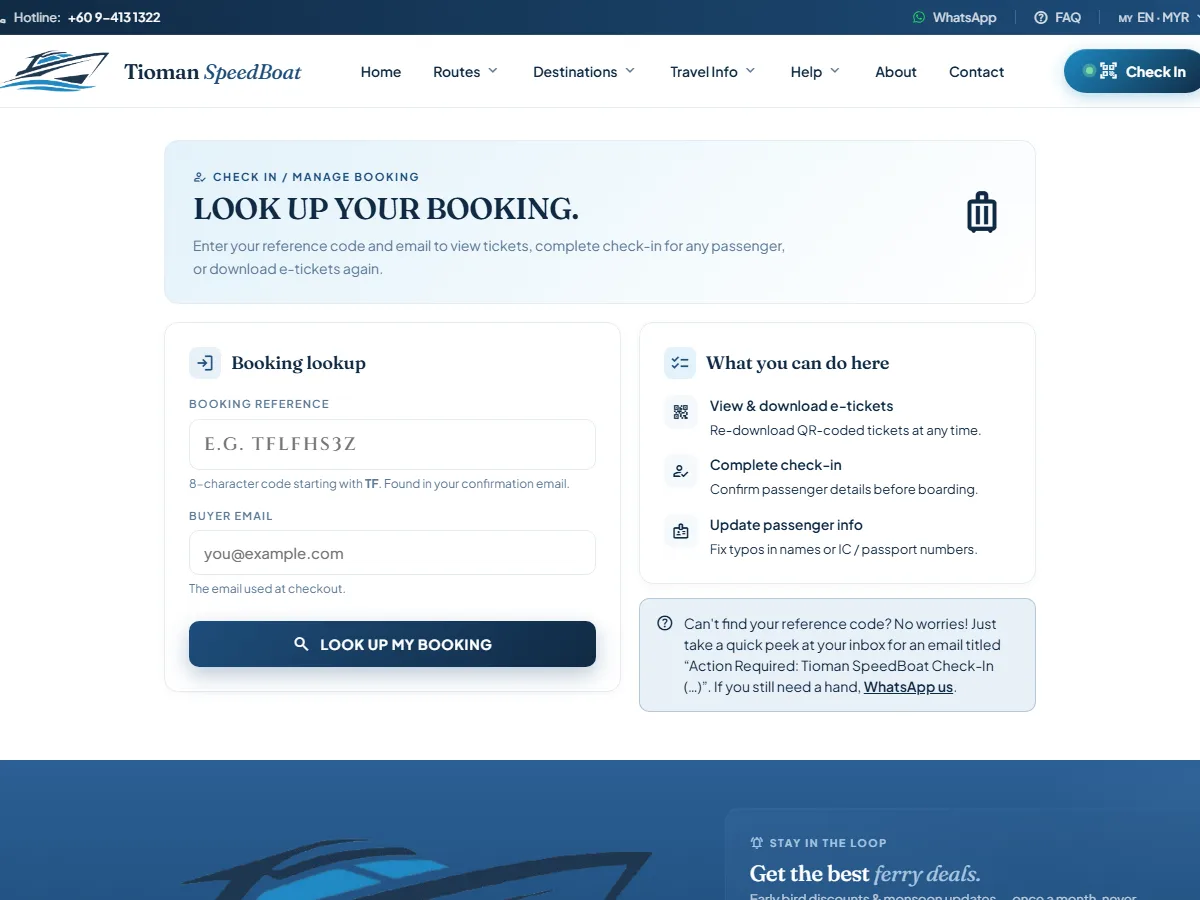
Visit the booking management page

Open /manage/ on your phone or computer. No app download required β€” works in any browser.

Go to the management page arrow_forward
Visit the booking management page screenshot
2

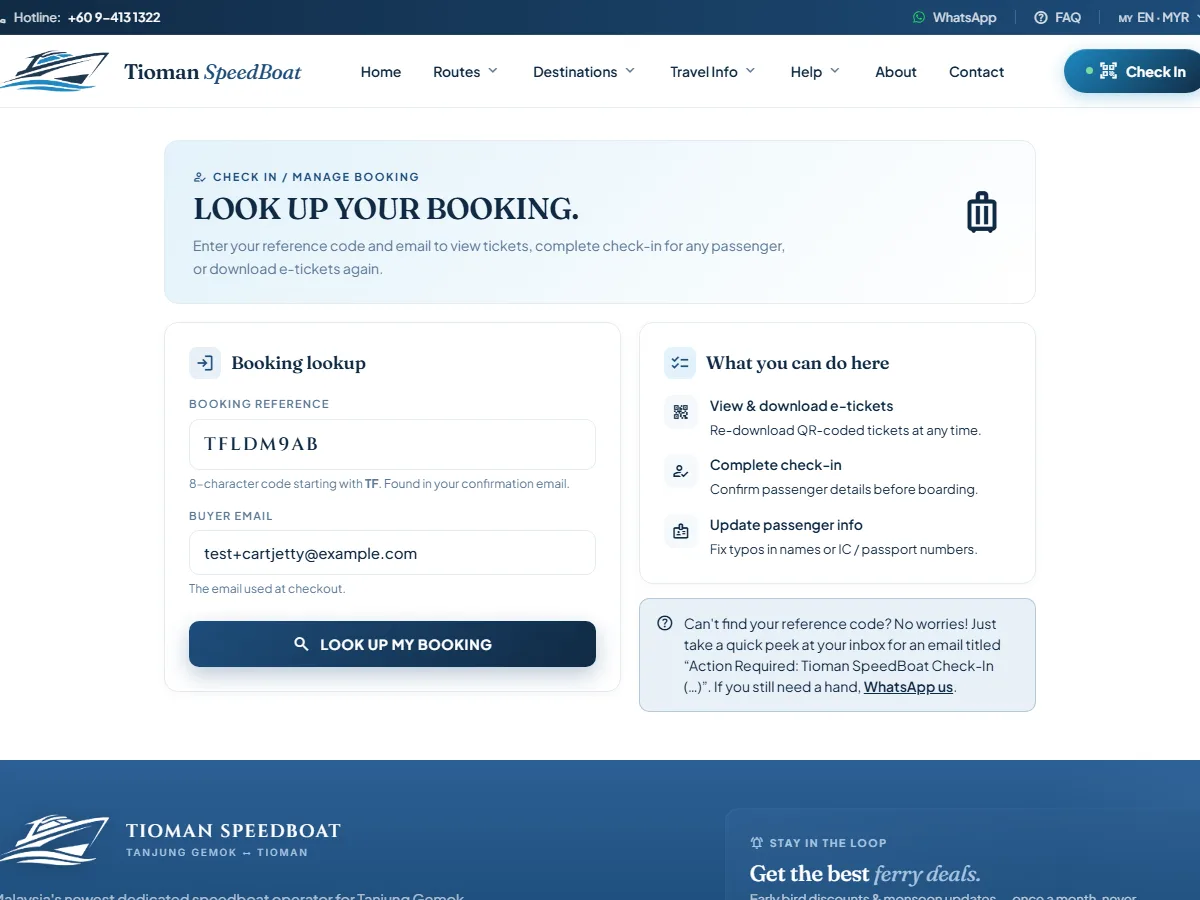
Look up your booking

Enter your booking reference number (from your confirmation email) and your email address or mobile phone number.
Look up your booking screenshot
3

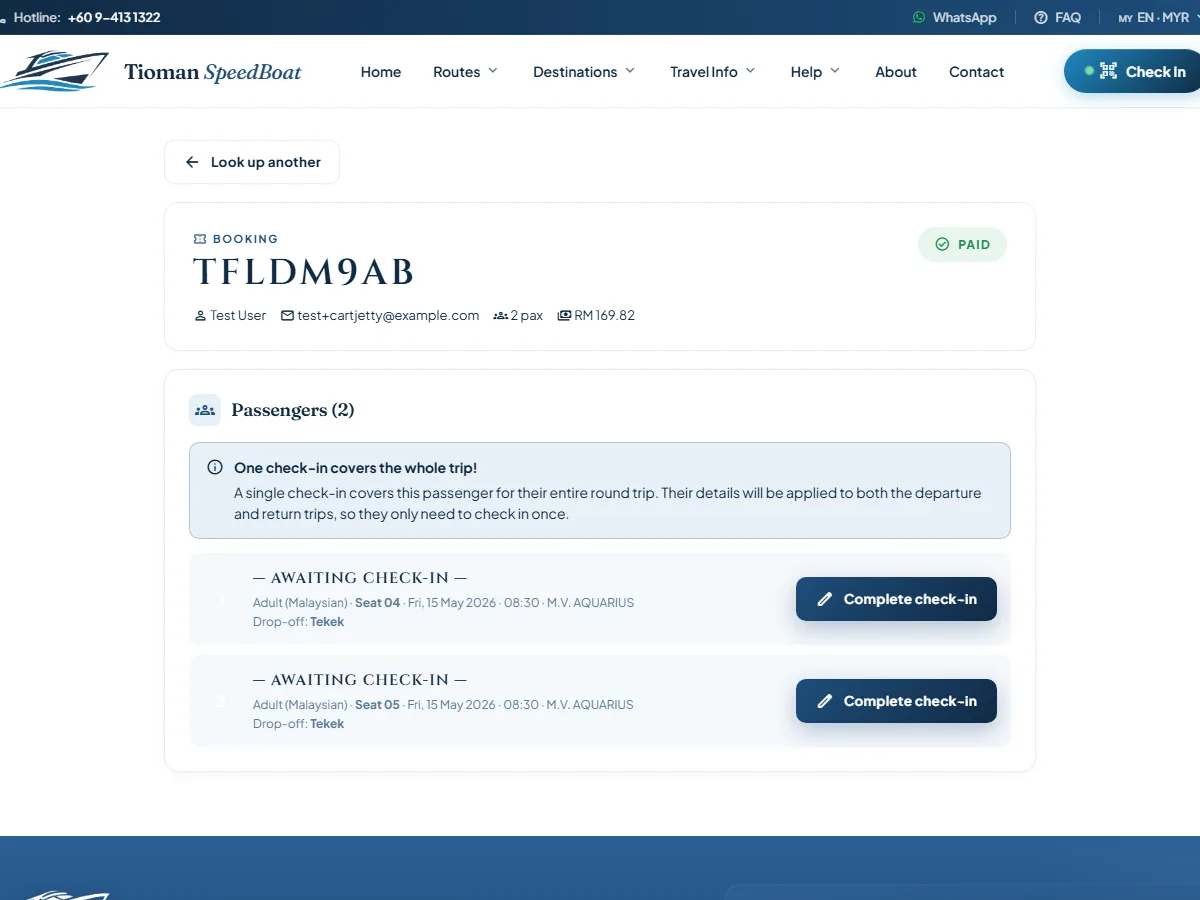
Verify passenger details

Check that all passenger names, ID numbers, and travel dates are correct. Update any details if needed before confirming.
Verify passenger details screenshot
4

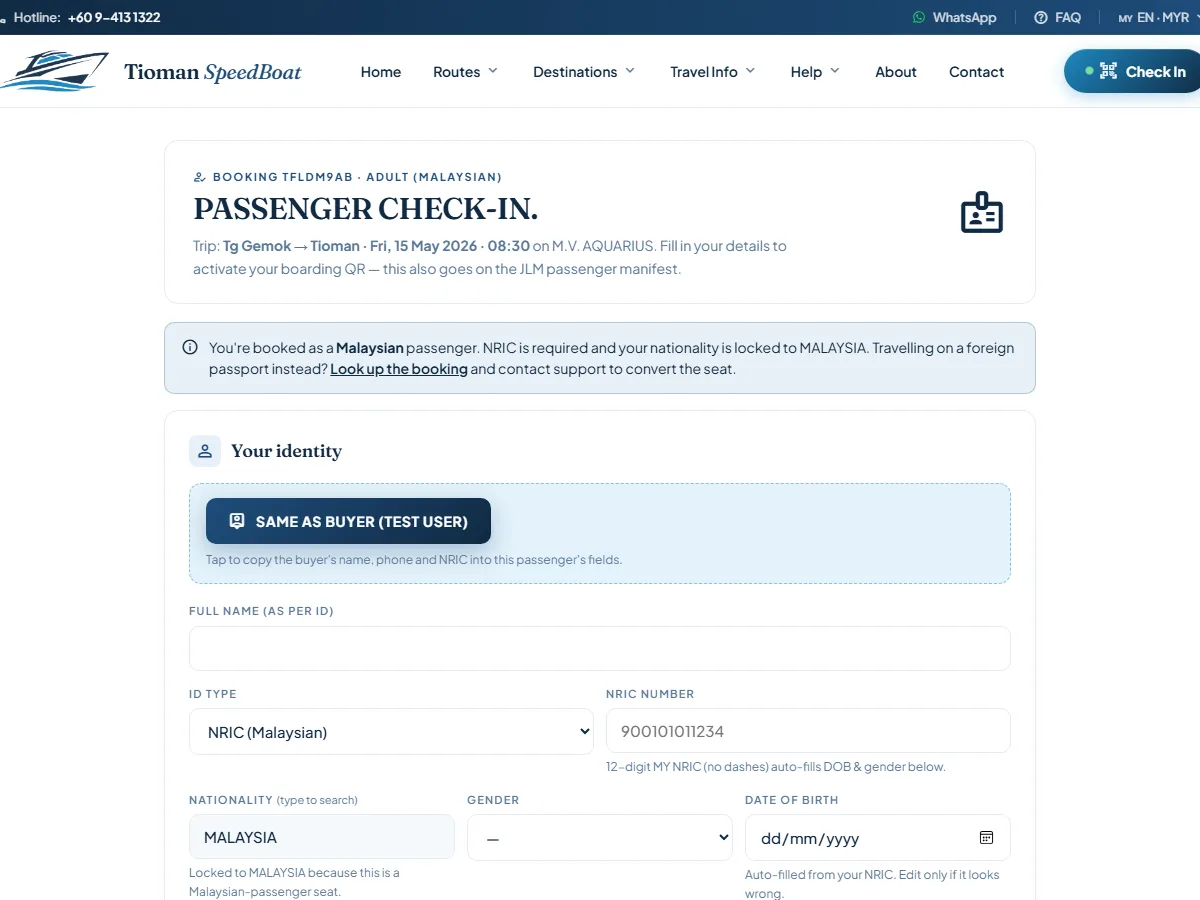
Confirm check-in

Click "Check In" for each passenger. The system verifies your details and generates a unique boarding pass.
Confirm check-in screenshot
5

Save your boarding pass

Each passenger receives a unique QR code. Screenshot it, download the PDF, or email it to yourself as backup.
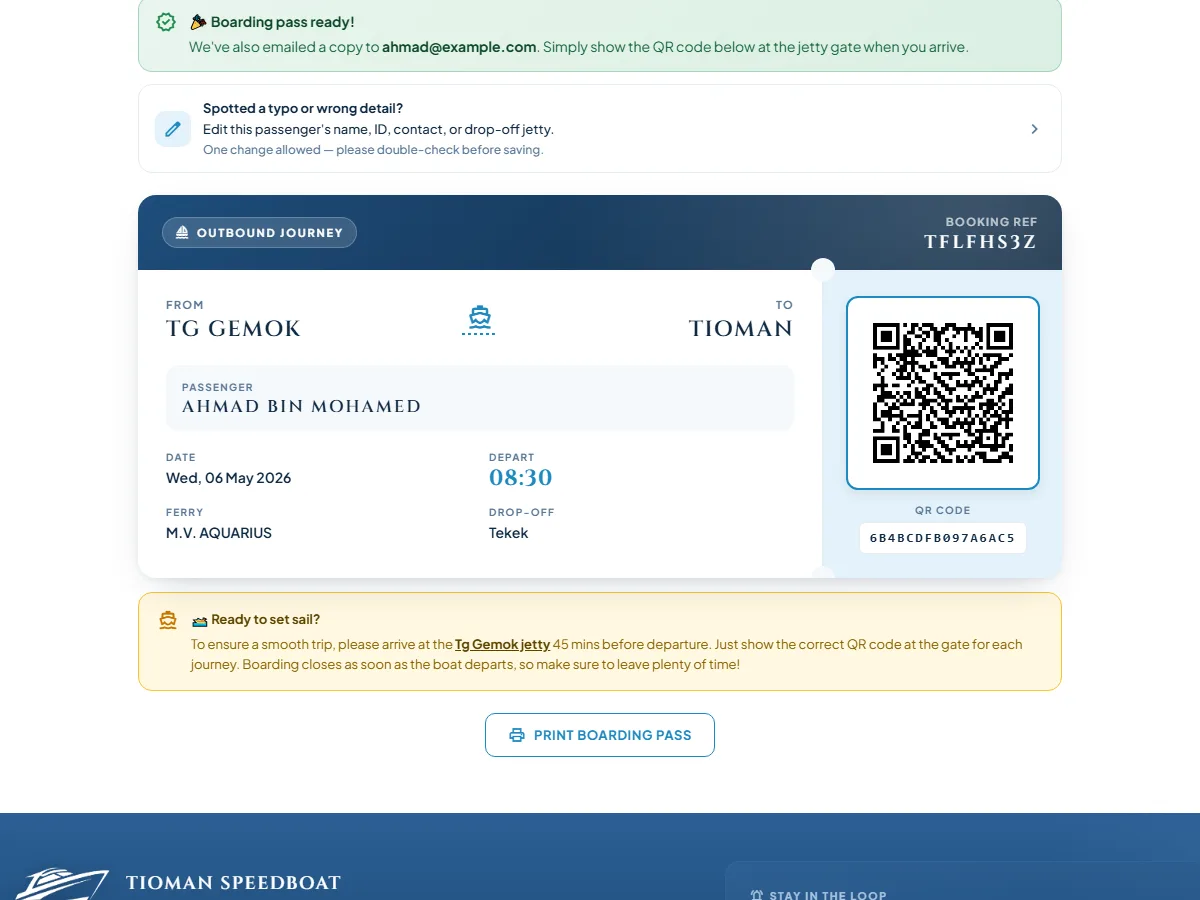
Save your boarding pass screenshot
6

Show QR code at the boarding gate

Arrive at Tanjung Gemok jetty and present your QR code at the boarding gate. Skip the ticketing queue and proceed directly to boarding.
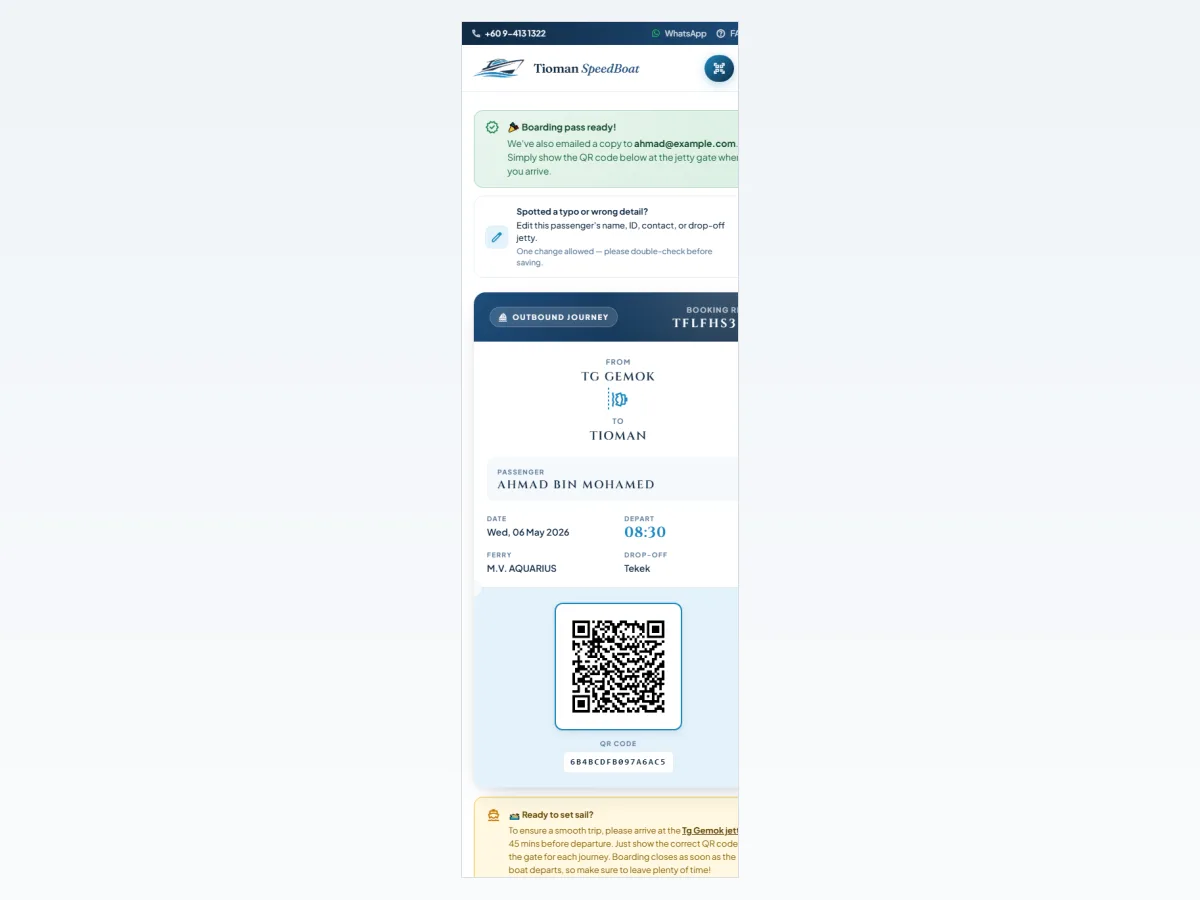
Show QR code at the boarding gate screenshot
Before You Start

What You Need for Online Check-In

Required
confirmation_number
Booking reference number
From your confirmation email or e-ticket
mail
Email address or phone number
Must match exactly what was used when booking
wifi
Internet connection
Mobile data or WiFi
Optional but helpful
battery_charging_full
Charged phone battery
For displaying QR code at the boarding gate
signal_wifi_off
Screenshot of QR code
Backup in case of poor signal at the jetty
print
Printed copy of QR code
Fallback if phone screen is damaged or unavailable
After Successful Check-In

Your Boarding Pass & QR Code

Each passenger receives an individual boarding pass. All four display formats are accepted at the gate.

What your boarding pass includes
  • checkUnique QR code for the passenger
  • checkSailing date, time, and route
  • checkVessel and seat information
  • checkBooking reference number
Acceptable display formats
smartphone Digital on phone screen
screenshot Email screenshot
print Printed paper copy
picture_as_pdf PDF saved to phone
info

QR code cannot be scanned? Show staff your booking reference number and original ID. They can verify your identity manually and process boarding without the QR code.

Reasons to Check In Early

Why Check In Online?

Online check-in is optional but strongly recommended for peak weekend and public holiday sailings when counter queues are longest.

timer

Save 15–30 Minutes

Skip the jetty ticketing counter queue. Present your QR code at the boarding gate and go straight through.

check_circle

Confirm Details Early

Verify all passenger names and ID numbers in advance. Fix any issues before travel day, not at the gate.

eco

No Paper Ticket Needed

Your phone is your boarding pass. Reduce printing and paper waste.

Having Trouble?

Issues With Online Check-In

Most check-in problems are caused by a reference or email mismatch. Here are the most common issues and how to resolve them quickly.

error_outline Booking reference not recognised
Fix: Check the reference exactly as shown in your email β€” no spaces, no extra characters.
mail_lock Email or phone number mismatch
Fix: Use the exact email address or phone number entered when the original booking was made.
schedule Outside the 24-hour window
Fix: Wait until check-in opens 24 hours before your sailing, or contact us for assistance.
badge Passenger details mismatch
Fix: Names must match your ID exactly. Contact us to correct passenger details before your sailing.

Still unable to check in? Contact us with your booking reference and we will resolve it before your sailing day.

call60198301228
Sailing Day

At Tanjung Gemok Jetty

Counter check-in is always available as a fallback. These timings apply whether you check in online or at the counter.

storefront

Counter Check-In

  • scheduleCounter opens from 7:00 AM during operating hours
  • badgeBring original ID for all passengers (photocopies not accepted)
  • confirmation_numberBring printed or digital booking confirmation
  • peopleAllow 60 minutes before departure for queuing during peak sailings
  • directions_boatBoarding closes 20 minutes before scheduled departure
checklist

Same-Day Boarding Tips

  • schedule Arrive at Tanjung Gemok jetty 60 minutes before your scheduled departure.
  • local_parking Allow 15 minutes for parking and the walk to the terminal entrance.
  • badge Carry original IC (Malaysians) or passport (non-Malaysians) for gate verification. Photocopies are not accepted.
  • luggage Check baggage at the designated drop area before proceeding to the boarding gate.
  • directions_boat Proceed to the boarding gate 30 minutes before departure. Boarding closes 20 minutes before scheduled sailing.
Frequently Asked Questions

Check-In FAQs

01 When does online check-in open? expand_more
Online check-in opens 24 hours before your scheduled sailing time and closes 30 minutes before departure. For example, for a 9:00 AM Saturday sailing, check-in is available from 9:00 AM Friday until 8:30 AM Saturday.
02 How do I access online check-in? expand_more
Visit /manage/ and enter your booking reference and the email address or phone number used when booking. No account or login is required.
03 Can I check in for multiple passengers at once? expand_more
Yes. After looking up your booking, check in each passenger individually from the same booking reference. All passengers in a group booking can be checked in together.
04 What if I do not have my booking reference? expand_more
Search your email inbox for "Tioman SpeedBoat" to find your booking confirmation. If still not found, contact us at 60198301228 with your name and travel date.
05 Do I have to check in online? expand_more
No. Online check-in is optional but recommended for peak sailings. Counter check-in is always available at Tanjung Gemok jetty β€” allow 60 minutes before departure to account for queuing.
06 My QR code will not scan at the gate. What do I do? expand_more
Show staff your booking reference number and original ID. They can verify your identity manually and process boarding without the QR code.
07 If I miss the online check-in window, can I still board? expand_more
Yes. Even without online check-in, you can board your sailing by checking in at the Tanjung Gemok jetty counter. Arrive at least 60 minutes before departure.

Ready to Check In for Your Tioman Sailing?

Visit the booking management page with your booking reference. Online check-in takes under 2 minutes and your QR code is ready instantly.